
图像变换
- 移动的并不是图像,而是坐标系本身。
- 对于之前已经绘制的图像没有影响。
javascript
ctx.translate(100, 100)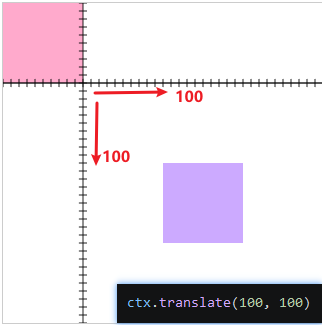
图像放缩
- 图像放缩是对坐标进行放缩,而不是图像本身。
javascript
ctx.scale(2, 1);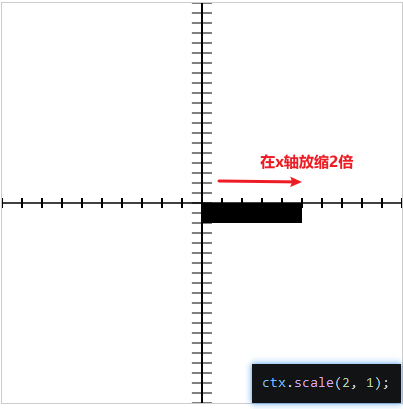
图像旋转
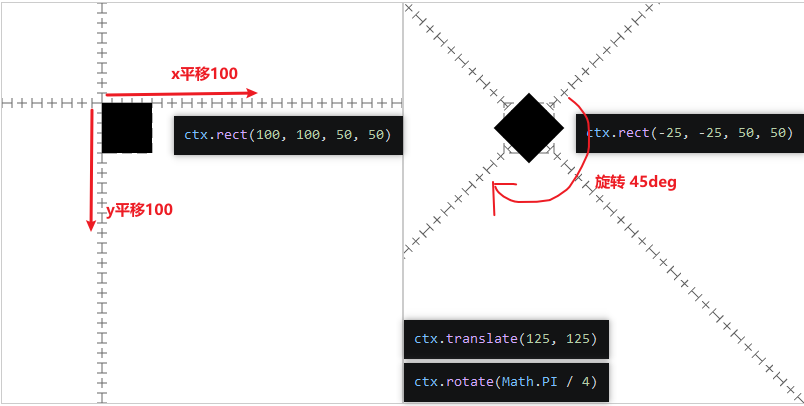
- 由于旋转也是在坐标轴上进行旋转的,要想在视觉上原地旋转,需要通过变位后旋转,在调整图像的位移的位置。
javascript
(() => {
 const canvas = document.createElement('canvas')
 canvas.width = 400
 canvas.height = 400
 const ctx = canvas.getContext('2d')
 document.body.append(canvas)
 ctx.beginPath()
 ctx.setLineDash([10,5])
 ctx.strokeStyle = "#666"
 ctx.rect(100, 100, 50, 50)
 ctx.stroke()

 ctx.translate(125, 125)
 ctx.rotate(Math.PI / 4)

 // 绘制坐标系
 ctx.beginPath()
 ctx.moveTo(-400, 0)
 ctx.lineTo(400, 0)
 ctx.stroke()

 ctx.moveTo(0, -400)
 ctx.lineTo(0, 400)
 ctx.stroke()

 for (let i = -400; i < 400; i += 10) {
     ctx.beginPath()
     ctx.moveTo(i, -5)
     ctx.lineTo(i, 5)
     ctx.stroke()

     ctx.beginPath()
     ctx.moveTo(-5, i)
     ctx.lineTo(5, i)
     ctx.stroke()
 }

 ctx.beginPath()
 ctx.rect(-25, -25, 50, 50)
 ctx.fill()

})();
图像矩阵
ctx.transform(a,b,c,d,e,f)

x' = a·x + c·y + e
y' = b·x + d·y + f
1' = 1·0 + 1·0 + 1
- e 和 f 控制上下文的水平和垂直平移。
- 当 b 和 c 为 0 时,a 和 d 控制上下文的水平和垂直缩放。
- 当 a 和 d 为 1 时,b 和 c 控制上下文的水平和垂直倾斜。
a, d:x、y 方向的缩放
b, c:旋转/斜切
e, f:平移
1_)平移矩阵
javascript
// 以下两种都能进行x 和 y 轴移动100
ctx.transform(1, 0, 0, 1, 100, 100)
ctx.transform(0, 1, 1, 0, 100, 100)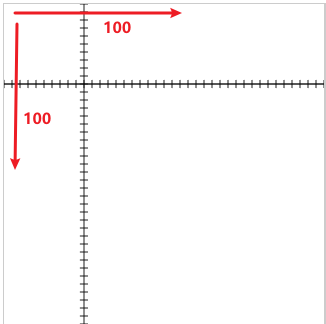
2_)缩放矩阵
javascript
// 在 y轴缩放至 2
ctx.transform(1, 0, 0, 2, 0, 0)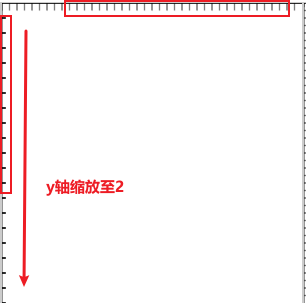
3_)倾斜矩阵
javascript
// x轴倾斜.5,x平移20,y平移20
ctx.transform(1, 0, .5, 1, 20, 20)
4_)旋转矩阵
旋转 θ 角的公式(数学标准,逆时针为正):
x' = x·cosθ − y·sinθ
y' = x·sinθ + y·cosθ
对应到 Canvas 矩阵:
text
| cosθ  −sinθ  0 |
| sinθ   cosθ  0 |
|  0      0    1 |
所以 a = cosθ,b = sinθ,c = −sinθ,d = cosθ。
注意:因为 Canvas 的 y 轴朝下,正角度在视觉上是顺时针旋转。
_常见角度
| 角度 | sin | cos | 小数 |
|---|---|---|---|
| 0° | 0 | 1 | 0 / 1 |
| 30° | 1/2 | √3/2 | 0.5 / 0.866 |
| 45° | √2/2 | √2/2 | 0.7071 / 0.7071 |
| 60° | √3/2 | 1/2 | 0.866 / 0.5 |
| 90° | 1 | 0 | 1 / 0 |
旋转45°
javascript
ctx.transform(0.866, 0.5, -0.5, 0.866, 0, 0)等价于:
javascript
const deg = 45
ctx.transform(Math.cos(deg * Math.PI / 180), Math.sin(deg * Math.PI / 180), -Math.sin(deg * Math.PI / 180), Math.cos(deg * Math.PI / 180), 0, 0)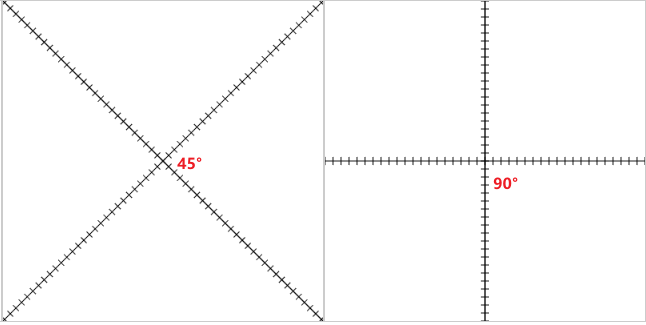
横向距离sin() 纵向距离cos()